A Record vs CNAME Record: Differences, Examples and When to Use Each
A records and CNAME records are two of the most commonly used DNS record types. Both can help direct users toward a website or online service, but they work differently and are not interchangeable in every situation.
Understanding the difference between an A record and a CNAME record can prevent website outages, incorrect routing, duplicate configuration, and DNS validation problems.
What Is an A Record?
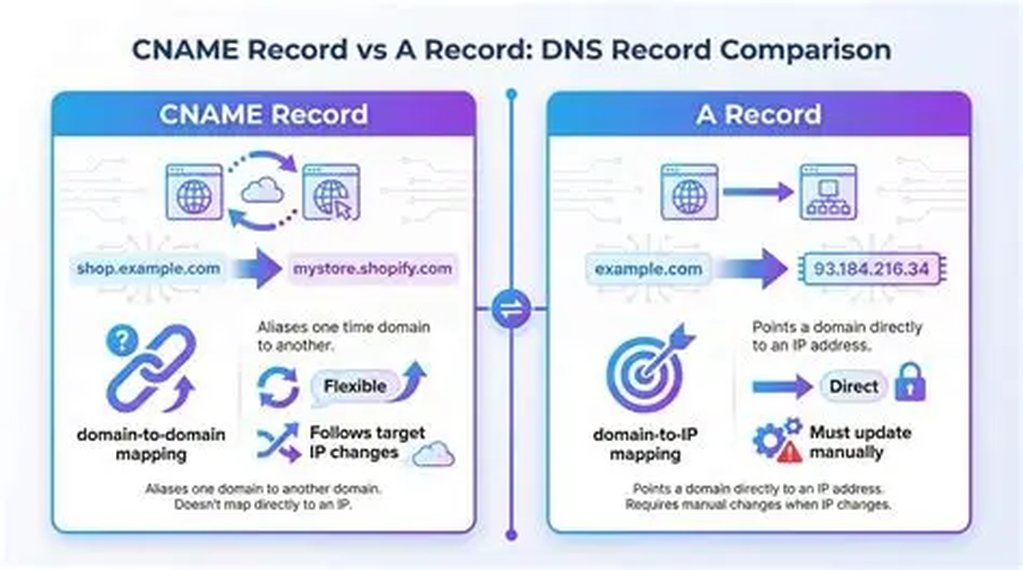
An A record maps a domain name or hostname directly to an IPv4 address.
Example:
example.com → 192.0.2.10When a DNS resolver requests the A record for example.com, it receives the IPv4 address configured in the DNS zone.
A records are commonly used for:
- Root domains
- Web servers
- Application servers
- API endpoints
- VPN gateways
- Mail server hostnames
What Is a CNAME Record?
A CNAME record maps one hostname to another hostname instead of mapping it directly to an IP address.
Example:
www.example.com → example.comThe resolver then continues the lookup process for the target hostname to obtain the final address.
CNAME records are commonly used for:
- www subdomains
- Hosted SaaS applications
- Content delivery networks
- Cloud platforms
- Domain verification
- Service aliases
A Record vs CNAME Record
| Feature | A Record | CNAME Record |
|---|---|---|
| Points to | IPv4 address | Another hostname |
| Common use | Server address | Hostname alias |
| Requires another lookup | No | Usually yes |
| Typical root-domain use | Yes | Depends on DNS provider features |
| Automatically follows target IP changes | No | Yes |
When Should You Use an A Record?
Use an A record when you know the IPv4 address of the destination server and want the hostname to resolve directly to that address.
Example:
app.example.com → 203.0.113.25An A record is appropriate when:
- You manage the server IP address
- The service provider gives you a fixed IPv4 address
- You are configuring the root domain
- You need direct DNS resolution to an IPv4 endpoint
When Should You Use a CNAME Record?
Use a CNAME record when a provider gives you a hostname instead of an IP address.
Example:
store.example.com → shops.hosted-platform.exampleA CNAME is especially useful when the target provider may change its underlying IP addresses. Your DNS record continues pointing to the provider's hostname rather than requiring you to update every IP change manually.
Can a Hostname Have Both a CNAME and Another Record?
A hostname configured as a CNAME should not normally contain other DNS record types at the same name. Combining a CNAME with A, MX, TXT, or other records at the identical hostname can produce invalid or unsupported configurations.
For example, avoid configuring both of these at the same name:
portal.example.com CNAME target.example.net
portal.example.com A 192.0.2.10
Can You Use a CNAME at the Root Domain?
Traditional DNS behavior makes root-domain CNAME usage problematic because the zone apex must also contain required records such as SOA and NS.
Some DNS providers offer features such as CNAME flattening, ALIAS, or ANAME-style behavior. These features can provide CNAME-like functionality at the root domain while returning address records to resolvers.
Check your DNS provider's documentation before configuring the root domain.
How to Check an A Record
Use a DNS lookup tool and select the A record type. Confirm that the returned IPv4 address matches your server or hosting provider.
You can also use:
nslookup example.comOn systems with dig:
dig A example.comHow to Check a CNAME Record
Select CNAME in a DNS lookup tool and enter the complete hostname.
Example:
www.example.comDo not check only example.com if the CNAME is configured for www.example.com.
Common A and CNAME Record Problems
- A record points to an old server
- CNAME target contains a typing error
- Old AAAA record sends IPv6 users elsewhere
- Root domain and www hostname point to different services
- CNAME is configured at the wrong hostname
- Proxy or CDN settings hide the origin IP
- Multiple conflicting records exist
Frequently Asked Questions
Is a CNAME record a redirect?
No. A CNAME is a DNS alias, not an HTTP redirect. It does not send a browser from one URL to another.
Can a CNAME point to an IP address?
No. A CNAME target must be a hostname, not an IPv4 or IPv6 address.
Which is faster: A or CNAME?
An A record can be resolved directly, while a CNAME may require an additional lookup. In most properly configured environments, the practical difference is small because DNS responses are cached.
Conclusion
Use an A record to point a hostname directly to an IPv4 address. Use a CNAME record to make one hostname an alias of another hostname.
Use the DNSCheckers.com DNS Lookup tool to inspect A and CNAME records and verify that your domain is pointing to the correct destination.
