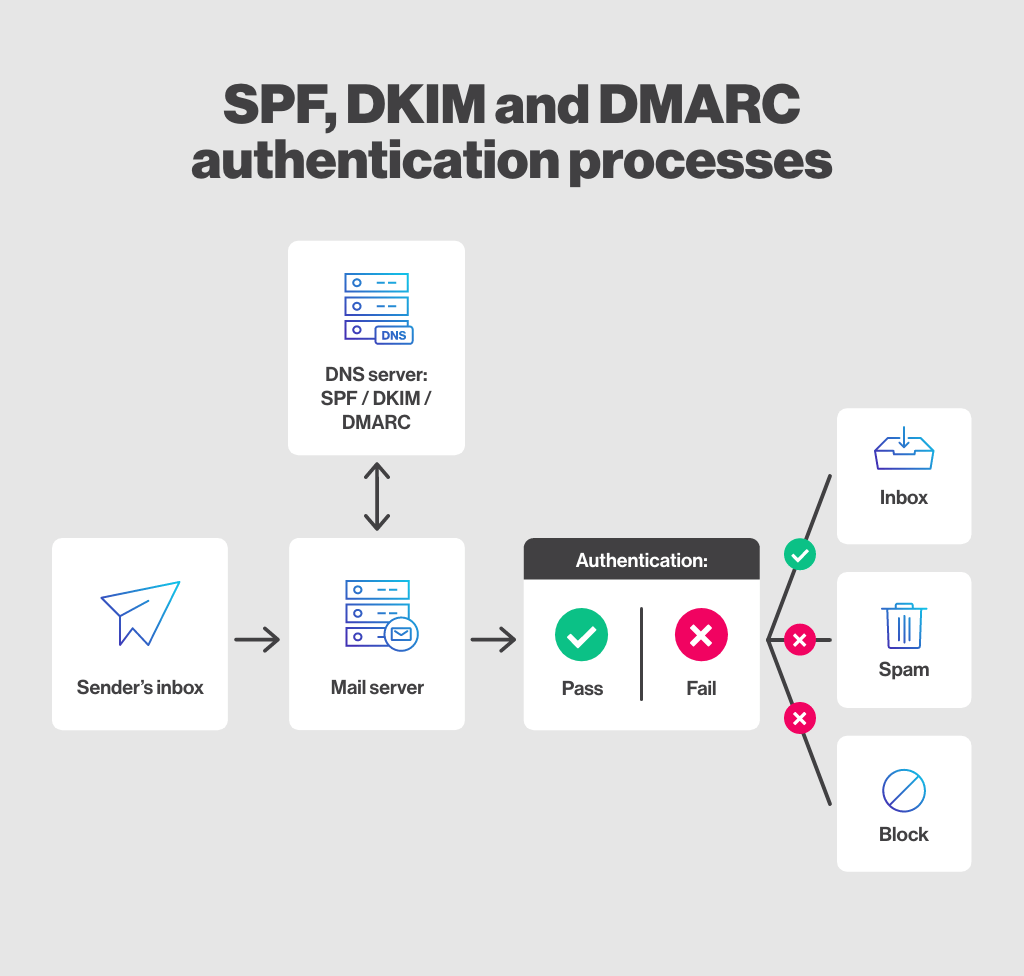
DNS TXT Record Lookup: How to Check SPF, DKIM and DMARC Records
TXT records store text-based information in DNS. They are widely used for domain verification, email authentication, security policies, and service configuration.
A DNS TXT record lookup helps you confirm whether SPF, DKIM, DMARC, and verification records have been published correctly.
What Is a DNS TXT Record?
A TXT record allows a domain owner to publish text data within the DNS zone.
Common uses include:
- SPF email authorization
- DKIM public keys
- DMARC policies
- Domain ownership verification
- Certificate validation
- Cloud platform verification
- Security service configuration
How to Check TXT Records
- Enter the domain or exact TXT record hostname.
- Select TXT as the record type.
- Run the DNS lookup.
- Review every returned TXT value.
- Compare the result with the value supplied by your service provider.
Windows command:
nslookup -type=TXT example.comLinux or macOS command:
dig TXT example.comHow to Check an SPF Record
SPF identifies the systems authorized to send email using a domain.
An SPF record normally begins with:
v=spf1Example:
v=spf1 include:_spf.example.net ip4:192.0.2.10 -allCommon SPF mechanisms include:
- ip4
- ip6
- a
- mx
- include
- exists
- all
Common SPF Problems
- Multiple SPF records exist at the root domain
- A sending service is missing
- An old provider remains authorized
- The record contains too many DNS-dependent lookups
- The record contains a syntax error
- The final all mechanism is too permissive
A domain should normally publish one consolidated SPF policy rather than several separate records beginning with v=spf1.
How to Check a DKIM Record
DKIM allows a mail system to add a cryptographic signature to outgoing messages. The receiving server retrieves the public key from DNS and uses it to validate the signature.
DKIM records are published under a selector hostname:
selector1._domainkey.example.comThe selector is chosen by the email provider. Enter the complete selector hostname when performing the lookup.
A DKIM TXT record commonly begins with:
v=DKIM1Common DKIM Problems
- Wrong selector
- Record created at the root domain
- Missing public key
- Broken quotation or line formatting
- DKIM signing is not enabled at the provider
- Old key remains published after rotation
How to Check a DMARC Record
DMARC allows a domain owner to publish a policy for messages that fail aligned SPF and DKIM checks. It can also request aggregate and failure reports.
DMARC is published at:
_dmarc.example.comExample:
v=DMARC1; p=none; rua=mailto:dmarc@example.comCommon DMARC policy values include:
- p=none
- p=quarantine
- p=reject
Common DMARC Problems
- Record is published at the wrong hostname
- Multiple DMARC records exist
- The reporting address is incorrect
- The policy is changed to reject before legitimate senders are aligned
- SPF passes but does not align with the visible From domain
- DKIM passes but uses an unrelated signing domain
TXT Records for Domain Verification
Cloud services frequently ask domain owners to publish a unique TXT value. This proves control of the DNS zone without requiring a website file or email response.
When verification fails:
- Check the exact hostname requested.
- Confirm that the value was copied without additional characters.
- Check which nameservers are authoritative.
- Run a TXT lookup against the exact hostname.
- Wait for cached negative responses to expire if the record was previously missing.
How to Interpret a TXT Lookup
A domain may legitimately contain several TXT records. Do not assume every TXT value belongs to SPF, DKIM, or DMARC.
Search for the relevant prefix:
- SPF: v=spf1
- DKIM: v=DKIM1
- DMARC: v=DMARC1
For DKIM and DMARC, check the complete selector or policy hostname instead of querying only the root domain.
Frequently Asked Questions
Can a domain have multiple TXT records?
Yes. A domain may use separate TXT records for verification, security, and other services.
Can a domain have multiple SPF records?
Publishing multiple independent SPF policies for the same hostname can cause SPF evaluation errors. Combine authorized senders into one SPF record.
Why does my DKIM lookup return no result?
The selector may be wrong, the record may not be published, or the provider may use a CNAME-based DKIM configuration.
Does DMARC work without SPF and DKIM?
DMARC evaluation depends on aligned SPF or DKIM results. A practical email authentication deployment should configure and test both.
Conclusion
TXT record lookups are essential for email authentication and domain verification. Always query the exact hostname, inspect the record syntax, and confirm that the published value matches the service provider's instructions.
Use the DNSCheckers.com DNS Lookup tool to check TXT, SPF, DKIM, DMARC, and domain verification records.
